PHOTO TO DANCING CAT
Your cat. A new dance.
Use a cat photo and a five-second dance reference to make an AI cat dance video. Start with the same motion excerpt as our example, then give the result a Rainbow finish.
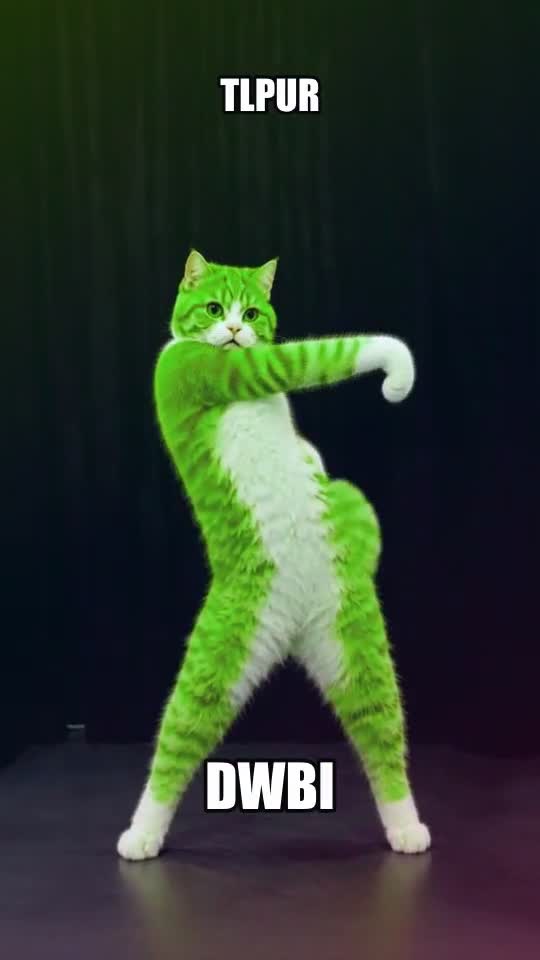
Choose a photo the model can follow
Keep one cat clearly visible, with its body and legs inside the frame. Avoid a crowded background or a crop that cuts off the subject. The supplied example is an upright cat character; a different pose or camera angle can produce a different result.
Make the movement, then add the look
- Review the starter. Open the motion preview and check the selected five-second range. You can switch to another motion or upload a reference you can use.
- Add your character. Replace the sample photo, check framing and review the credit estimate. Sign in when you are ready to generate.
- Inspect the result. Watch the feet, face and background. AI motion transfer can change details or distort limbs; a clean input does not guarantee a particular result.
- Finish the joke. Open the completed clip in the style editor. Choose Rainbow, adjust intensity and add DWBI or your own caption.
What is free, and what uses credits?
Browsing motions and styling an existing clip do not use generation credits. Creating a new AI video uses the model and duration shown in the studio. The style editor processes an uploaded clip in your browser; it does not create the dance itself.
Before sharing your cat video
Check the exported file, caption position and sound. Use photos and references you have permission to use, and review any music rights before posting elsewhere. Start with a vertical source if you want a vertical result; the editor preserves the source proportions.
Follow the full TLPUR video tutorial · Read what TLPUR means